Template · Free
Stack: the classic, done properly
One clean column, every project a tap away. It looks like the link in bio people expect, with the details makers need.
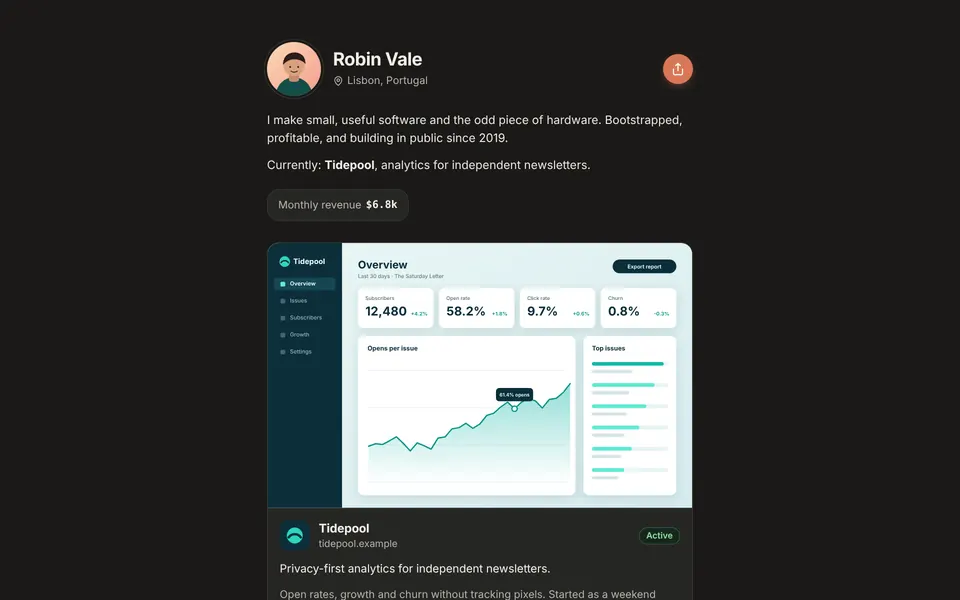

How it is laid out
Stack is a single centered column. Your photo, name and location head the page, then your bio and, if you have it, your total monthly revenue.
Each project is a compact card: logo, name, a one-line description, revenue and a status pill on the right. Projects you mark as large become featured cards with a screenshot, web address, longer details and tags. Your subscribe box and social links close the page.
Who it suits
Everyone, honestly. Stack is the template that is hardest to get wrong. It reads instantly on a phone, which is where most link in bio visits happen, and it works whether you have one project or twenty.
It is a good default if you are moving from Linktree or another list-style tool, because visitors will know exactly what to do. See makerhandle vs Linktree.
Free forever
Stack is on the free plan, along with Showcase and Minimal. Pair it with any of the free palettes, or on Pro choose an accent color, font and corner style, or build a custom theme.
Switch to another template any time; your projects stay as they are. See all templates and themes.
Questions
Is Stack free?
Yes. Stack is one of three free templates.
Can Stack show screenshots?
Yes, on projects you mark as large. Other projects show as compact cards.
Does Stack show status?
Yes. Every card has a status pill: Active, Building, Acquired, On hold or Discontinued.
Can I switch templates later?
Yes, at any time, without losing content.
Start with Stack
Free for up to 5 projects. Pro is $20/year.