Template · Pro
Bento: your work as a grid of tiles
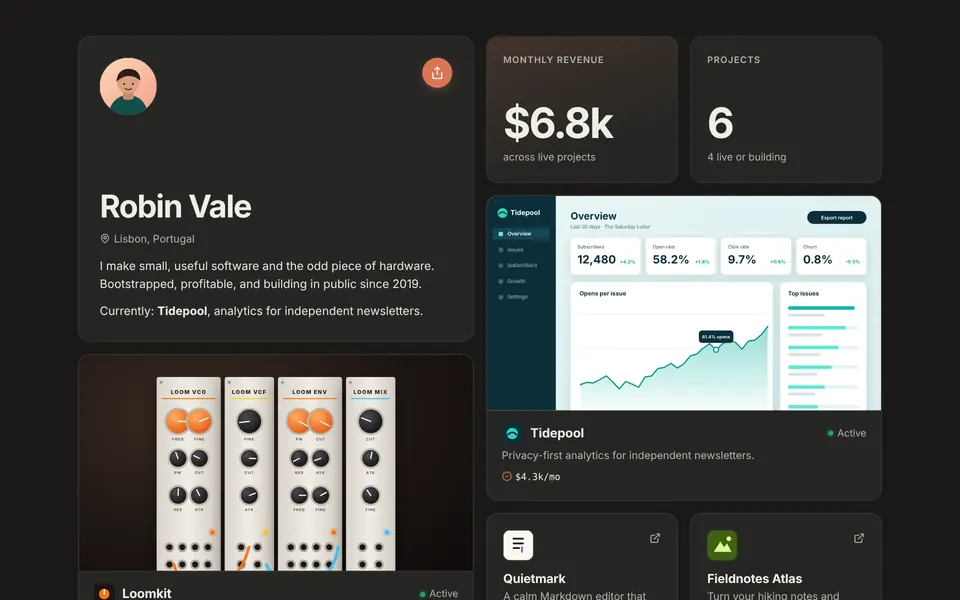
A profile tile, a revenue tile, featured projects large and the rest small, all on one grid that always lines up. Popular with former Bento.me users.

How it is laid out
Bento puts everything on a four-column grid (two on a phone):
- a profile tile with your photo, name, location and bio
- a monthly revenue tile, marked Verified when it comes from Stripe or Shopify
- a projects tile with your count and how many are live or building
- each featured project as a large tile with its screenshot, status and revenue
- every other project as a small tile with logo, name, status and revenue
- a links tile and a subscribe tile to close
The closing tiles size themselves to fill whatever the last row leaves open, so the grid always ends flush. On a phone, an odd tile out goes full width rather than leaving a gap.
Who it suits
People with a mix of things to show: a couple of main products, several small ones, some numbers and a newsletter. It looks like a personal dashboard and reads at a glance.
If you used Bento.me before it closed, this will feel familiar, with project status and verified revenue added. See the Bento alternative.
Part of Pro
Bento is included in Pro at $20 a year, with Spotlight, Terminal and Studio. Pro also adds unlimited projects, every palette and the theme builder, a custom domain and no badge.
Try it with your own content in the editor's live preview before upgrading, or open the demo above. See all templates and themes.
Questions
Is the Bento template free?
No. Bento is part of Pro, which is $20 a year. Showcase, Stack and Minimal are free.
How do I make a tile large?
Mark the project as large in the editor. It becomes a big tile with its screenshot.
Does it work on phones?
Yes. The grid becomes two columns and fills gaps automatically.
Is this related to Bento.me?
No. It is makerhandle's own grid template. Bento.me was a separate product, which has since closed.
Try the Bento template
Free for up to 5 projects. Pro is $20/year.